Find and close the process with Linux console

Linux ‘netstat’ command finds out which process is listing upon a port. Obviously, you usually need it when something doesn’t allow to start/restart an application or docker. Read more»

Create a group in Linux with command line :sudo addgroup nginxusers sudo usermod -a -G nginxusers newusername Read more»
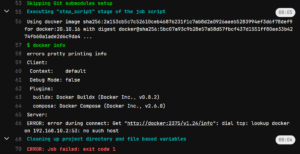
How to fix Gitlab CI error during connect: Post http://docker:2375/v1.40/auth: dial tcp: lookup docker on … no such host. I spent more than 1 hour to fix it. And I am totally not sure that I will remember it 🙂 Read more»
Vagrant is a cool application for the automation of the development of the virtual machines. It allows to create a VM for VirtualBox in several seconds or minutes, and it’s very cool. But rather other you want to use it offline, otherwise you can use AWS or something like that. So I will write down […] Read more»
I will write some useful commands to work with Docker. If I use them often, I will remember them, otherwise I will remember them quickly if I read this post. Read more»
As it turned out, I can execeute linux scripts at my Windows PC with WSL installed with Powershell! Just write ‘wsl -e ‘ and after that a command to execute. Read more»
The short manual how to remove Apache 2 from Ubuntu with bash Linux command line. 4 steps. I advice you to execute all the commands with sudo. Read more»
I read a lot about how to connect to Linux desktop from Windows RDP. Each description is simple- install XRDP and that’s it. Ok, not only XRDP, but XORG also. Read more»
Ubuntu is one of the most favorite operation systems. It is free, it is easy to install it to any PC, you do not worry about viruses and other no good things, which Windows systems have. But in Ubuntu you can have different problems with proprietary software and drivers. One of the common problems with […] Read more»
Открывая в Midnight commander текстовый файл для редактирования, запускается редактор VIM. Возможно, я б выбрал другой, но хостер установил этот. Это бесплатный редактор, особенность которого в том, что в VIM нужно вручную переключать режимы ввода – командный и текстовый. Т.е. чтоб ввести текст нужно включить один режим, а чтоб его сохранить – переклчюить режим на командный. […] Read more»