Microsoft Office

Iterate table columns in PowerBI data transformation

PowerBI applies a lot of functions automatically or you can make them manually. But if you work with a dynamically changed data, for example, when new columns are added in SharePoint list, and you don’t want to add them manually every month (week, year, etc), you can automatically iterate through them. Read more»

Microsoft Office

How to merge Excel cells

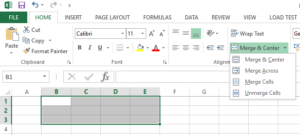
Figure 3. Merge cells in Excel

You can merge Excel cells in 3 simple steps: Select a range of cells. Right click on the selected cells and then choose Format Cells (Figure 1) Go to the Alignment tab and check the checkbox “Merge cells” (Figure 2).   The other way to merge cells in Excel is via Excel Ribbon. This way […] Read more»

Microsoft Office

Popular Posts