Add user to Nginx folder
Create a group in Linux with command line :sudo addgroup nginxusers sudo usermod -a -G nginxusers newusername Read more»
Create a self-signed public certificate to authenticate your application in PowerShell Read more»
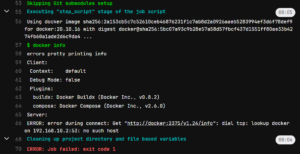
How to fix Gitlab CI error during connect: Post http://docker:2375/v1.40/auth: dial tcp: lookup docker on … no such host. I spent more than 1 hour to fix it. And I am totally not sure that I will remember it 🙂 Read more»
Vagrant is a cool application for the automation of the development of the virtual machines. It allows to create a VM for VirtualBox in several seconds or minutes, and it’s very cool. But rather other you want to use it offline, otherwise you can use AWS or something like that. So I will write down […] Read more»
I will write some useful commands to work with Docker. If I use them often, I will remember them, otherwise I will remember them quickly if I read this post. Read more»
I am tired to look for Vi shortcuts, let the copy of this content stay here. Press Esc to start waiting for the command and after that enter the action. Read more»
As it turned out, I can execeute linux scripts at my Windows PC with WSL installed with Powershell! Just write ‘wsl -e ‘ and after that a command to execute. Read more»
The error is: Configuration loaded builds=0listen_address not defined, metrics & debug endpoints disabled builds=0[session_server].listen_address not defined, session endpoints disabled builds=0In gitlab runners allor “Run untagged jobs: Indicates whether this runner can pick jobs without tags”, set the checkbox correspondingly. Read more»
The short manual how to remove Apache 2 from Ubuntu with bash Linux command line. 4 steps. I advice you to execute all the commands with sudo. Read more»
The commandlet ‘Get-ChildItem’ will give you all the default information about the folders inside. By default they are: Mode, LastWriteTime, Length (for files) and Name. Get-ChildItem c:\Path Read more»