Horizontal scroll of Div on Button Click in React

The code of the React component to scroll DIV content by axe X. It can be useful when you have a wide table and a narrow screen. Or a designer had a very cool idea of the interface. Read more»

In HTML tag ‘input type = number’ is not very user friendly. So, I always implement it as a text with transformation text to number. Read more»
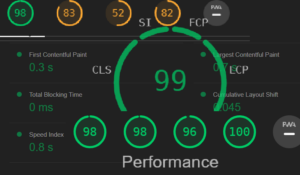
Sometimes I like to use calculate different measures for one or another site. Last weekend I read about Lighthouse – it’s a part of DevTools in Google Chrome. I have already forgotten that I have such a powerful tool in my pocket and don’t use it. What is Lighthouse? Lighthouse is an open-source, automated tool […] Read more»
DataGrid looks like a table, but it’s another component, it consists of multiple div-elements. But for a user it’s a table and common table attributes are often required. One of them is striped rows. Below there’s an example how to implement it. Read more»
If you use a Pro version of Material UI, then you have a tool, how to switch the cells in the DataGrid table. But if you work with a wide table and you just want to make it more comfortable to work with it, there are some tricks for that. The first thing is to […] Read more»
To modify the size of the TextField component in Material UI, you can make several things. The basic modification is obvious, but other ones are not so. By default, the component TextField is rather big and it’s really a common task to make it less. Read more»
Unlike classic Javascript applications, React works with Virtaual DOM, that’s why it’s not obviously how to add or remove class to the element. I will write about one of the ways how to make it. Read more»
We have an array of strings in React Application. Let’s call it ‘selectedParticipants’. And for the summary page we need to write all the members of array in one line with comma ‘,’ between elements and dot ‘.’ in the end in JSX block. Here is a small snippet. Read more»
When I started to work with SPFX solutions for SharePoint, I couldn’t understand how to load external CSS files. I came up with one solution, but it was a crutch. I did it with embedding <styles> tag into JSX. It looked like this: Read more»
I used EventCalendar component with resources and timeline view, the default interval is 1 month, I also add week numbers to the header. I wanted to fit the calendar to the page without horizontal scroll. Read more»