
If you need to audit your SharePoint Farm, detect what SharePoint software is installed in your area or to align versions of test and production areas, I recommend you to use PowerShell.
The string to add SharePoint snappin to PowerShell console is more long than the command:
if(!(Get-PSSnapin Microsoft.SharePoint.Powershell -ErrorAction:SilentlyContinue))
{
Add-PSSnapin Microsoft.SharePoint.Powershell
}
and the command:
(Get-SPFarm).products
It will return something like this:
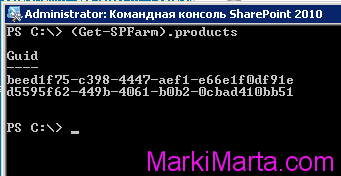
To find out what these GUIDs mean, please refer to the table below.
| VALUE | PRODUCT |
| 84902853-59F6-4B20-BC7C-DE4F419FEFAD | Project Server 2010 Trial |
| ED21638F-97FF-4A65-AD9B-6889B93065E2 | Project Server 2010 |
| BC4C1C97-9013-4033-A0DD-9DC9E6D6C887 | Search Server 2010 Trial |
| 08460AA2-A176-442C-BDCA-26928704D80B | Search Server 2010 |
| BEED1F75-C398-4447-AEF1-E66E1F0DF91E | SharePoint Foundation 2010 |
| 1328E89E-7EC8-4F7E-809E-7E945796E511 | Search Server Express 2010 |
| B2C0B444-3914-4ACB-A0B8-7CF50A8F7AA0 | SharePoint Server 2010 Standard Trial |
| 3FDFBCC8-B3E4-4482-91FA-122C6432805C | SharePoint Server 2010 Standard |
| 88BED06D-8C6B-4E62-AB01-546D6005FE97 | SharePoint Server 2010 Enterprise Trial |
| D5595F62-449B-4061-B0B2-0CBAD410BB51 | SharePoint Server 2010 Enterprise |
| 926E4E17-087B-47D1-8BD7-91A394BC6196 | Office Web Applications 2010 |
| 35466B1A-B17B-4DFB-A703-F74E2A1F5F5E | Project Server 2013 |
| BC7BAF08-4D97-462C-8411-341052402E71 | Project Server 2013 Preview |
| 9FF54EBC-8C12-47D7-854F-3865D4BE8118 | SharePoint Foundation 2013 |
| C5D855EE-F32B-4A1C-97A8-F0A28CE02F9C | SharePoint Server 2013 Standard |
| B7D84C2B-0754-49E4-B7BE-7EE321DCE0A9 | SharePoint Server 2013 Enterprise |
| D6B57A0D-AE69-4A3E-B031-1F993EE52EDC | Microsoft Office Web Apps Server 2013 |
In my case I have SharePoint Foundation 2010 and SharePoint Server 2010 Enterprise installed in my SharePoint farm.
To find out a build of SharePoint use another command:
get-spfarm | select BuildVersion
You can use it when you create a test area or when you need to align versions.