
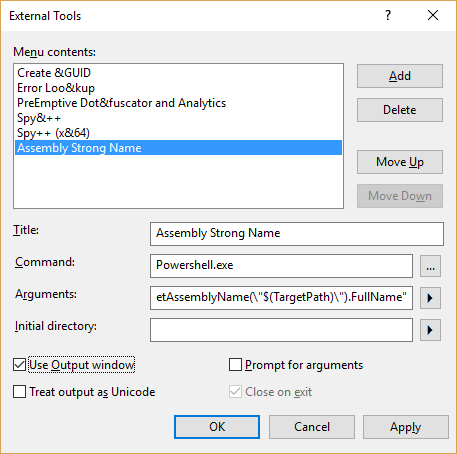
When I was developing a web service for SharePoint 2010 I had to fill in “assembly strong name” in .asmx file. Below I repost a very nice method how to get an “assembly strong name” in Visual Studio.
1. In Visual Studio, go to Tools –> External Tools.
2. Click on “Add” to add a tool, and put in the following values:
3. Fill Title: Assembly Strong Name
4. Fill Command: Powershell.exe
5. Fill Arguments: -command “[System.Reflection.AssemblyName]::GetAssemblyName(\”$(TargetPath)\”).FullName”
6. Check “Use Output Window” and uncheck everything else (Fig.1)
Then go to Tools -> Assembly Strong Name and in Output window you will see the assembly strong name (Fig.2):
ContactManagerWebApp, Version=1.0.0.0, Culture=neutral, PublicKeyToken=null
