
Create and fill hash of arrays in Powershell
You can initialize and fill multidimension hashes (arrays) in powershell this way: Read more»
You can initialize and fill multidimension hashes (arrays) in powershell this way: Read more»

This is an manual how to work with arrays in PowerShell – how to create them, fill and read. You can initialize array this way: Read more»
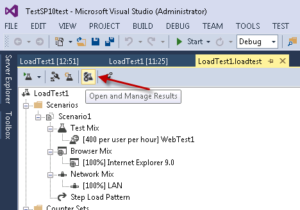
When you execute load test in Visual Studio, you may want to see previous results or to move results to another machine if you need to make report. I had to spend some time to look for the buttons to manage results of Load test in Visual Studio 2013. Read more»

There are at least 2 ways to find physical path of shared folder in Windows (server or client OS – not important) – from command line console or from Snap-In “Shared Folders” in MMC. Read more»

Открывая в Midnight commander текстовый файл для редактирования, запускается редактор VIM. Возможно, я б выбрал другой, но хостер установил этот. Это бесплатный редактор, особенность которого в том, что в VIM нужно вручную переключать режимы ввода – командный и текстовый. Т.е. чтоб ввести текст нужно включить один режим, а чтоб его сохранить – переклчюить режим на командный. […] Read more»
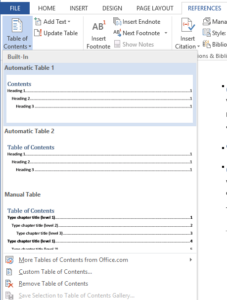
Word allows you to create a Table of Contents automatically. It searches headings in your document and creates contents according to them. Headings must be set via headings styles in tab “Home”. Read more»
In PowerShell you can use a lot of modules and classes of your machine. Built-in system class “System.Environment” allows you to get a lot of useful information about your machine. Its syntax is like this [System.Environment]::class_property or [System.Environment]::class_method. Read more»
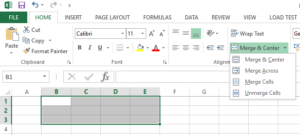
You can merge Excel cells in 3 simple steps: Select a range of cells. Right click on the selected cells and then choose Format Cells (Figure 1) Go to the Alignment tab and check the checkbox “Merge cells” (Figure 2). The other way to merge cells in Excel is via Excel Ribbon. This way […] Read more»
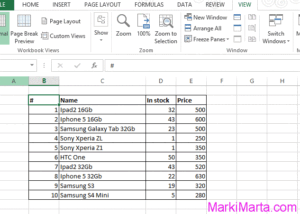
Excel has a huge number of tools for customizing text and tools to count data. So, one of useful things is to rotate text on any angle. It can be useful for customizing table headers. Read more»
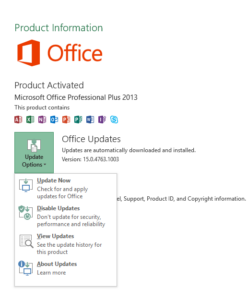
During long use of Microsoft products, I got a habit that to update Microsoft Office I need to download Service Pack for my MS Office version. But in MS Office 2013 I can easily press some buttons for updates. Read more»