

If you rely on default values in Power Automate’s Initialize variable action, watch out—it can occasionally fail without throwing an explicit syntax error.
In one of my SharePoint flows, I initialized a variable (itemId) to hold an item ID and set its default value directly within that step. I used this variable throughout the rest of the flow. Everything worked fine initially, but after saving a minor update, the flow suddenly failed.
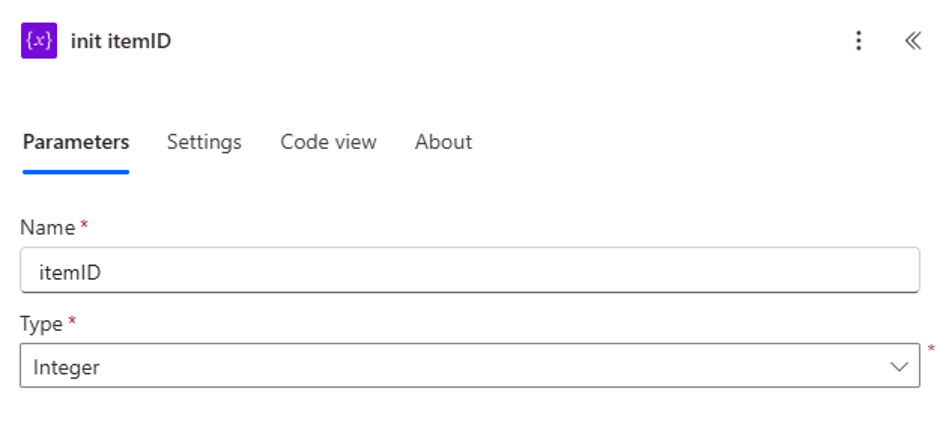
Checking the run history revealed that every request using itemId was passing 0. The variable was initializing, but the assigned value was completely ignored or cleared out.
Oddly enough, while I was researching the issue with the editor window still open, the Value field suddenly reappeared on its own—without me touching anything.
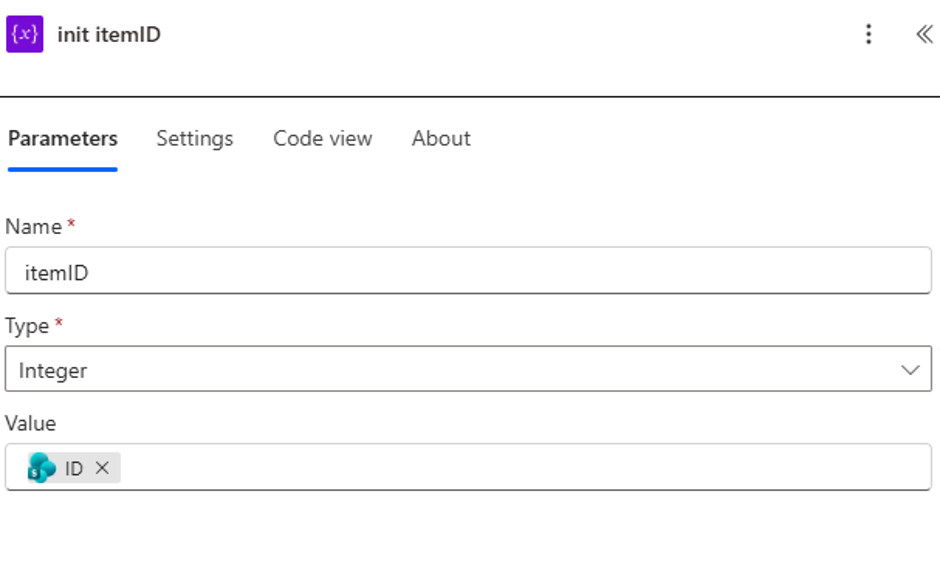
My Takeaway To avoid relying on this unreliable editor behavior, I now treat initialization and assignment as two separate steps:
- Initialize variable (leave the value empty or blank).
- Set variable (assign the actual dynamic content or default value immediately after).
If your flow suddenly starts passing blank or zero values out of nowhere, check your variable initialization step—or just split it into an explicit Set variable action to be safe.