
PowerShell

Execute PowerShell script in Task Scheduler
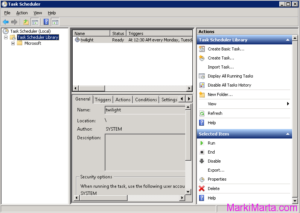
Figure 1. Task scheduler

PowerShell is a very flexible tool for Windows and Windows-software administrators. You can do a lot of things with it. Sometimes you start to think of how to execute powershell scripts from Task Scheduler. It’s not enough just to add a PS-file in scheduler, you need to do something more. Read more»
Windows

Save WSP file from SharePoint Farm

It’s very important for SharePoint administrator to have all actual WSP-files of custom SharePoint solutions. Developers often make new builds and administrator installs it in test environment, then in productive one. All the WSP-files are usually stored in a special place. Read more»

SharePoint

Execute commands on Remote machine using Windows PowerShell

If you are an administrator of several servers, I don’t think you want to execute PowerShell script on each server manually, especially if you have 20 or more servers. Since PowerShell 2.0 you can execute commands on remote computers using PowerShell via WinRM (Windows Remote Management) service. Read more»

Windows

Manage SharePoint alerts and subscribes using PowerShell

Alerts in SharePoint is a powerful tool for users but about a nightmare for administrator. It’s not comfortable for administrator to see user subscribes and manage them. Read more»

SharePoint

PowerShell script to add column to SharePoint list

PowerShell script to add column to SharePoint list. It’ useful when you want to make changes in your SharePoint list in test area and then to repeat in productive one. Read more»

SharePoint

Get SharePoint version via PowerShell

If you need to audit your SharePoint Farm, detect what SharePoint software is installed in your area or to align versions of test and production areas, I recommend you to use PowerShell. Read more»

SharePoint

Remove Items from SharePoint Recycle filtered by URL

If you removed a number of SharePoint list items (moved to Recycle Bin), I think you want to clean the Recycle from them. Of course you can remove them manually but it’s not a good idea if you have deleted 10000 records or more (Remove a lot of elements from very large SharePoint Lists). Read more»

SharePoint

Remove a lot of elements from very large SharePoint Lists

Lists in SharePoint is only look like database tables but not they are. For some things they are even better than databases – for common users for example, but for developers and administrators they are often not so good and friendly. Read more»

SharePoint

Convert Sandboxed Solution to Farm Solution in SharePoint

Once when I started to work over the project which used about 30 SharePoint Lists and their data should be displayed on some interfaces, I decided to use Sandboxed solution. When I started Visual studio and began to write code, everything was fine. No restarting IIS after deploying, I could easily press F5 and not […] Read more»

SharePoint

Popular Posts