Windows

Using System.Environment Class in PowerShell

In PowerShell you can use a lot of modules and classes of your machine. Built-in system class “System.Environment” allows you to get a lot of useful information about your machine. Its syntax is like this [System.Environment]::class_property or [System.Environment]::class_method. Read more»

Windows

Execute PowerShell script in Task Scheduler

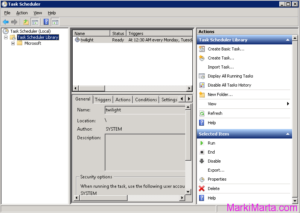
Figure 1. Task scheduler

PowerShell is a very flexible tool for Windows and Windows-software administrators. You can do a lot of things with it. Sometimes you start to think of how to execute powershell scripts from Task Scheduler. It’s not enough just to add a PS-file in scheduler, you need to do something more. Read more»

Windows

Execute commands on Remote machine using Windows PowerShell

If you are an administrator of several servers, I don’t think you want to execute PowerShell script on each server manually, especially if you have 20 or more servers. Since PowerShell 2.0 you can execute commands on remote computers using PowerShell via WinRM (Windows Remote Management) service. Read more»

Windows

PowerShell script to extract file from zip-archive

The PowerShell script below extracts one file from zip-archive which contains several files. I use code like this to get files with financial references from zip-archives and update SharePoint lists from them. So there’s a lot of things where this sctipt can be used. Read more»

Windows

Create FTP Site in IIS in Windows 8

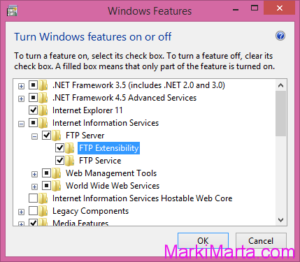
Figure 2. Add FTP Extension for IIS

No so long ago I decided to create FTP site for my home local area network. I wanted to read and write files not via file sharing but via File Transfer Protocol (FTP). I had Windows 8 Home Edition on my PC. So this PC became server for my FTP site. Read more»

Windows

Characters in Midnight commander via Putty from Windows 8

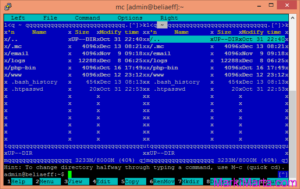
Midnight Commander with unreadable characters

When I first started Putty on my Windows 8.1 x64, connected to my server and ran Midnight Commander, I saw picture like this (see drawing 1). Instead of separating lines there were unreadable characters. It wasn’t what I expected to see and the first thing came in my mind is to fix it.  Read more»

Windows

Popular Posts