jQuery – check if checkbox element is checked

For jQuery 1.6+ use .prop() function. I don’t think it’s a good idea to support old versions and use .attr() or something like this. Read more»


Strange behavior of console.log() I have noticed when I created a JS code for SharePoint page. My code used jQuery and SPServices library. The code used to get items from a list and render options for “select” control. Below I post a part of my function which fills a JS array and renders options for […] Read more»
CsvHelper is a very good library for reading and writing CSV files. It’s really easy for coding and fast for work. You can install it via Nuget in Visual studio or download from the project page in GitHub https://github.com/JoshClose/CsvHelper. Read more»
Here is the snippet of how to Create Folder in Document Library programmatically using the Object Model. It can be used in console applications for loading documents or timer-jobs. Read more»
I have copied exported site to another farm and tried to restore. After executing of cmd-let for restoring spweb (Import-SPWeb -Identity http://spdev/forums/ -Path D:\Backups\forums.bak) I’ve got an error: Import-SPWeb : Could not find file ‘C:\Users\spadmin\AppData\Local\Temp\3\b386a19c-48bd-4a3a-b019-129ca9be4c5e\ExportSettings.xml’. Read more»
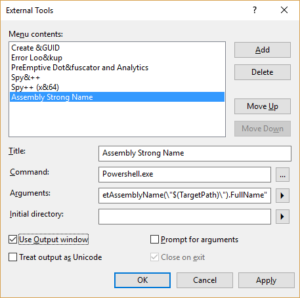
When I was developing a web service for SharePoint 2010 I had to fill in “assembly strong name” in .asmx file. Below I repost a very nice method how to get an “assembly strong name” in Visual Studio. Read more»
SPWeb object has 2 different properties for work with groups. There are Grops and SiteGroups. Inspite of the fact that they look very similar, they are different. Read more»
Information about files in document libraries is strored in the table “AllDocs” of Site’s content database. Of course, Microsoft doesn’t allow to make queries to SharePoint databases directly. But I can’t but agree with inserts and updates are not allowed, but select query in the worst case will make just some locks in database. So […] Read more»
The code below is my solution in creating a custom SharePoint List form. The list has a lookup column, the column is filled with Name (Fullnames) of employees. The task is to mark option with user Name as selected. Variable ‘user’ is equal to Name of employee. Read more»
Once I had to add about 3 thousand users to SharePoint group. Usually when I have to add about 100 users, I use Excel function ‘CONCATENATE’ to add user login and “;” separator to generate a list of users. And then I manually enter them. But 3 thousand users – it’s too much for manual. Read more»